
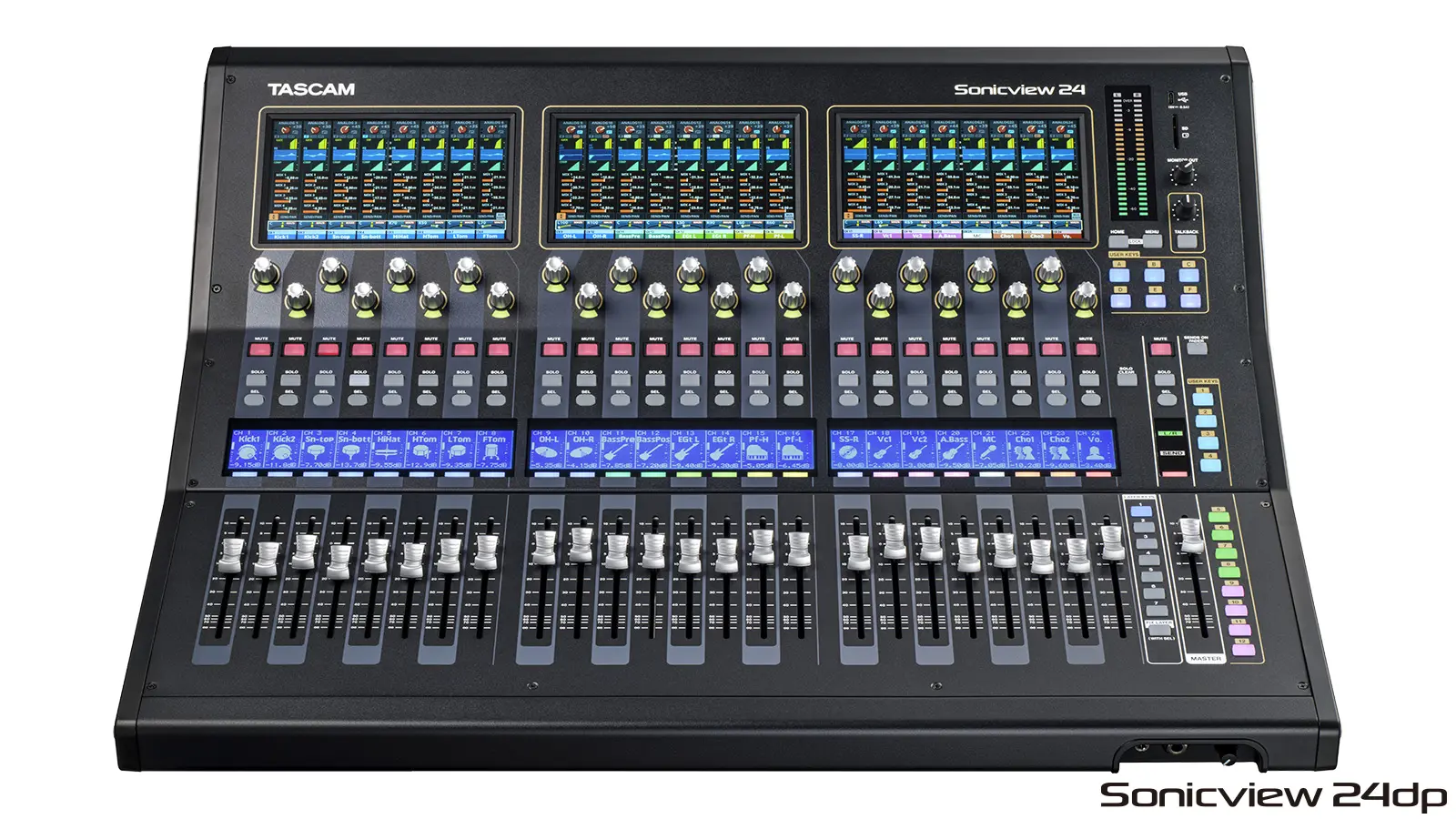
Product Highlights:
- 24 XLR Mic/Line Input Channels
- 32-In x 32-Out USB and SD-Card Recording
- 3x7" Touchscreens + Motorized Faders
- FPGA Mix Engine + 32-Bit / 96 kHz AD/DA
- 24 HDIA Microphone Preamps
- 8x 1/4" Line Inputs + 2 x 1/4" Inserts
- 16 XLR Bus / Outputs
- Four Stereo Effects Engines
- Including EQ, Dynamics, Filter and More
Overview:
TASCAM Sonicview 24XP, a next-generation multitrack recording and digital mixing console with multi-environment touchscreens, well suited for touring bands, concert halls, clubs, bars, special events, corporate meetings, and rental houses. Powered by a 96 kHz, 54-bit float-point FPGA mixing engine that utilizes 96 kHz / 32-bit AD/DA converters, the Sonicview 24XP provides 1st-class sonics with ultralow latency performance. Best of all, the hardware mixing surface and mix engine operate independently of each other for a highly stable and continuous audio workflow.
Key Features
- TASCAM VIEW (Visual Interactive Ergonomic Workflow) interface supports intuitive operation with three different view system
- Multiple displays with three 7-inch touch panels
- 44 input channels (or 40 mono input channels and 2 stereo input channels)
- 22 flexible output buses and main L/R bus with 31-band graphic EQ
- 96 kHz, 54-bit float-point FPGA mixing engine
- Ultralow latency: 2 x samples (20.8 μs) in mixing engine, 0.51 ms analog to analog
- 32-bit / 96 kHz AD/DA conversion
- TASCAM Class 1 HDIA microphone preamplifiers
- 32-in / 32-out, 32-bit / 96 kHz USB audio interface
- Built-in 32-track SDXC recorder
- 64-in / 64-out built-in Dante interface; supports redundancy and DDM, AES67 and SMPTE ST 2110 interoperability
- 24 mic/line inputs (up to +32 dBu), 16 XLR line outputs with flexible routing
- 4 multi-effects processors
- TASCAM Sonicview Control software for macOS/Windows/iPadOS enables remote control and off-line editing
- 2 TASCAM expansion slots
- SDXC multitrack recording card preinstalled in one slot (XP US version only)
- Optional MADI, Dante, AES/EBU, and analog outputs cards available for the second slot
- Hardware mixing surface and mixing engine operating system are independent of each other for high stability and continuous audio flow
- Library: Snapshot / Effect / Module / Parametric EQ / Graphic EQ / Gate / Compressor
- 18 assignable user keys, 7 custom fader layers, 8 DCA groups
- 24+1 100mm motorized faders
- 24 encoder knobs with color LED
- 24 LCDs with color LED display channel name, input level, and gain reduction meter
- 2 channel internal recording/playback with SD card or USB flash drive
- 8 TRS line inputs, 2 RCA stereo input pairs, XLR talkback input
- XLR monitor outputs
- 1/4" and 3.5mm headphone outputs
- Wordclock In and Out/Thru
- 1000BASE-T gigabit Ethernet
- 8-in / 8-out GPIO on DB25
- TRS footswitch jack
- XLR 4-31 lamp connector
- Power switch with guard
- Optional SB-16D 16-in / 16-out Dante-enabled stage box
Intuitive Operation at Your Fingertips
The Sonicview 24XP offers motorized channel faders in three banks of eight, plus a motorized stereo fader for the main bus. Above each bank of channel faders is a color touch panel that allows you to view entire mixer channels, or get down to details, controlling each parameter with your fingertip.
The Amazing VIEW
Truly the next generation in mixer user interfaces, the powerful intuitive TASCAM Visual Interactive Ergonomic Workflow (VIEW) system lets you quickly and easily configure the Sonicview 24XP’s three touchscreens.
Thanks to the VIEW user interface, there are three different ways to view your settings, and each touchscreen can be configured independently, so you can monitor and control any combination of settings you want, in whichever screens you want, whenever you want. For instance, you could monitor levels for eight channels of vocals on screen 1, while tweaking the parametric EQ on a drum submix on screen 2.
- To view the status of any eight adjacent channels at a glance, as you would see on vertical channel strips with an analog mixer, choose Channel Strip View.
- In Module View, you can monitor and control any two sets of parameters for one single channel, including the compressor, graphic EQ, effects send, and more.
- Individual View is the ultimate in customized displays. View any functions for any channel, group of channels, and more—all on different screens, simultaneously. For instance, you could simultaneously monitor the output bus meter on screen 1, and monitor levels on important input channels on screen 2.
High-End Audio Quality
Sonicview delivers the finest audio performance in its class, thanks to a 54-bit float-point FPGA mixing engine; continuous, high-definition 32-bit / 96 kHz sampling; and 32-bit analog-to-digital converters. The mixing engine's float-point processing makes it possible to flexibly change levels without compromising resolution and ensures ultralow latency, even in analog-to-analog connections. The result is no-compromises performance, including with Dante networks and in-line monitoring systems.
Input Channels and Processing
The Sonicview 24XP offers 16 channels with XLR mic/line inputs and another 8 channels with both XLR mic inputs and balanced TRS line inputs. You also get TRS insert points on two channels, two stereo pairs of RCA aux inputs, and an XLR input for a talkback mic.
Channel Control and Processing
There’s much more to Sonicview than meets the eye. Internally, Sonicview mixers have a generous 40 mono channels and 2 stereo channels so you can fly in backing tracks to make a small praise band sound huge, accommodate additional physical audio inputs via the expansion slots for larger ensembles, manage sources from every part of a venue via the Dante network, and mix dozens of DAW tracks. Eight DCAs enable you to easily control groups of channels. The programmable layer keys select which custom combination of channels and output buses are controlled by the motorized faders.
Each input channel can use any or all of 11 processing functions, which can be independently set:
- Delay (Input / Pre-Fader)
- Phase
- Digital Trim
- High-Pass Filter
- Gate/Expander/De-esser
- 4-Band Parametric EQ
- Compressor/Ducker
- Solo
- Mix 1-22 Send/Pan (Pre/Post)
- FX 1-4 Send/Pan (Pre/Post)
- Fader/Pan/Mute to L/R
Top-of-the-Line Class 1 HDIA Mic Preamps
- Each Sonicview microphone input feeds a TASCAM Class 1 HDIA (High Definition Instrumentation Architecture) preamp—the finest mic preamp TASCAM has ever made. Thanks to an instrumentation amplifier with extremely good noise characteristics in the first stage, Class 1 HDIA microphone preamps exhibit excellent EIN, signal-to-noise ratio, distortion ratio, and frequency response. Sonicview ultra definition mic preamps will pick up the slightest nuance from rosin on a violin bow to the subtle dynamic changes of a voice or saxophone. The mic inputs can accept up to +32 dBu signals, providing plenty of headroom for sudden level increases.
- The combination of Class 1 HDIA preamps, 32-bit/96 kHz ADCs, and their 54-bit FPGA mixing engine is impressive but they didn’t stop there: TASCAM conducted extensive internal and external evaluations to tune Sonicview mixers for optimal performance. The result is best-in-class sound that will never disappoint.
Output Buses and Processing
You get a wealth of output buses, with powerful signal processing and flexible routing options. In addition to the main L/R stereo bus, the Sonicview 24XP provides 22 output flex buses, each of which is configurable as a subgroup, aux, or matrix. Provide multiple stereo in-ear monitor submixes without running short of buses and send to the analog outputs; create matrix mixes for multiple loudspeaker zones and send over the Dante network for restaurants and worship performances, and more. All output buses are equipped with 31-band graphic EQ, real-time analyzer functions, 4-band parametric EQ, compressor/ducker, delay, plus solo, pan, and mute. Four additional effects processors can be assigned to any individual mixer channels, including an astounding reverb effect.
Dante-Enabled for Superior Networking
Dante audio-over-IP networks integrate thousands of concert touring systems, as well as installed systems in recording studios, radio stations, corporate boardrooms, houses of worship, and much more. Sonicview consoles can serve as the audio center of these systems, thanks to a built-in 64-in/64-out Dante interface that supports AES67 mode, Dante Domain Manager, and SMPTE 2110 mode. Two Dante ports enable redundant streams.
Physical Outputs and Expansion Capability
- As you’d expect, the Sonicview 24XP offers plenty of physical outputs, with 16 XLR line outputs, the L/R main outputs, and two XLR monitor outputs. If that’s not enough, you can add more analog, MADI, or AES/EBU I/O with an optional expansion card.
- To further expand the system, add one or more optional 16-in / 16-out SB-16D Dante-networked stage boxes. Microphone gain for all 16 inputs can be remotely controlled from the Sonicview 24XP, and the SB-16D can be used as a floor box or rackmounted.
Built-In 32-Track SD Recorder
Sonicview 24XP offers multiple ways to record. In addition to its integrated audio interface, the Sonicview 24XP comes with an integrated IF-MTR32 multitrack recording card, enabling you to capture 32 channels directly to an SDXC card. The SD recorder supports simultaneous 32-channel punch-in / punch-out, pre-record, auto-record, and markers. Best of all, it automatically saves and closes the file every 60 seconds during recording to safeguard against data loss, so you can let the recorder do it's job worry-free while you focus on mixing.
Built-In USB Audio Interface and Stereo Recording
- Sonicview’s integrated 32-in / 32-out USB audio interface makes it a first-rate front end for recording and broadcast studios, as well as for capturing live events. Record your choice of channel direct outs, flex buses, and the L/R main bus to your favorite DAW at up to 96 kHz with the same 32-bit precision used throughout the Sonicview.
- You can simultaneously capture the main mix directly to the onboard stereo SD recorder—handy when the band wants to listen to their performance at the hotel or on the bus. A top-panel port also lets you record in stereo to a USB flash drive.
Remote Control and Offline Editing
Whether onstage, backstage, in a control room, or at the rear of a concert hall, you're always in full control of your Sonicview 24XP mixer. Just connect a Wi-Fi router to the Sonicview's Ethernet port and use free TASCAM Sonicview Control software for macOS, Windows, and iPadOS to manage your Sonicview 24XP from virtually anywhere in the venue. Edit settings offline in advance, so you're ready to go when a session or show begins, then make adjustments from the console or from the software.
Work Quickly with Function Keys
Sonicview offers intuitive, analoglike operation, while providing a variety of convenient digital functions that can be customized as needed. Eighteen user-defined function keys can be assigned to recording with the internal recorder, playback, and more. Several keys are conveniently preassigned to functions such as Sends On Fader and Snapshot Recall, but you can reassign them as desired. A footswitch (not included) can be used to tap in delay-time settings.
Clear, Mistake-Free Navigation
When you're mixing a show, broadcast, or crucial recording session, you can't afford to hit the wrong button or grab the wrong control. Sonicview's mixing surface makes it easy to see at a glance what you're controlling, even in a dark concert hall. Each channel strip includes a channel-name LCD with a full-color LED. The User keys feature full-color LEDs, so you can group each input source and function by color and view them easily. The Solo and Channel Select keys have distinctive shapes, and the Mute key is guarded with a cap. With these features and the customizable touch panels, you always know where you are and what you're controlling.
External Control, Clocking, and More
In addition to audio I/O, Dante, and USB ports, Sonicview is equipped with 8-in / 8-out GPIO terminals (on a DB25 connector) for external control, making it suitable for events and relay applications. BNC wordclock In and Out/Thru enable digital audio synchronization, and an Ethernet port can connect to a Wi-Fi router for wireless control. Sonicview also has two TASCAM expansion slots; the IF-MTR32 multitrack SD recording card comes integrated into one slot, while the other slot accepts a selection of expansion cards.
The Music Never Stops
Your business depends on reliable equipment that will stay in service with minimal interruptions, and TASCAM designed the Sonicview accordingly. Sonicview's mixing engine and real-time operating system are completely separated from the physical mixing surface, greatly improving stability. In the unlikely event that the mixing surface becomes inoperable, the sound won't stop, and operation can be restored by restarting the control surface operating system. Meanwhile, the show will go on.